Your team’s own work
Internal projects can start without a client or brand. Choose the team, give the work an owner and keep the brief, files and next steps together.

AMS · Connected business workflows
Projects, publishing, conversations and finance for teams delivering client work. Keep the context behind every next step.
Your team chooses each next action: prepare a brief, assign the work, schedule an approved post and respond to an incoming conversation. Convert an accepted quotation into a draft invoice when you are ready. These are distinct decisions, with supported automation configured separately.
Illustrative product tour using fictional people and figures. Actions depend on your configuration, connected accounts and permissions.
Internal projects can start without a client or brand. Choose the team, give the work an owner and keep the brief, files and next steps together.
Add the client relationship when the work serves one. Link the relevant project so the team can understand who the agreement and deliverables belong to.
Use a brand for its identity and connected social accounts. Brands belong to client records; connect that context when publishing or handling customer conversations. Every internal task does not need that structure.
When an owner changes, the next teammate can read the task’s brief, discussion, attachments and recorded effort. Update responsibility and review access so the new person can continue from the existing work.
Keeping records in the shared workspace supports a handoff. What a person can see and change still follows the relevant permissions and data scope.
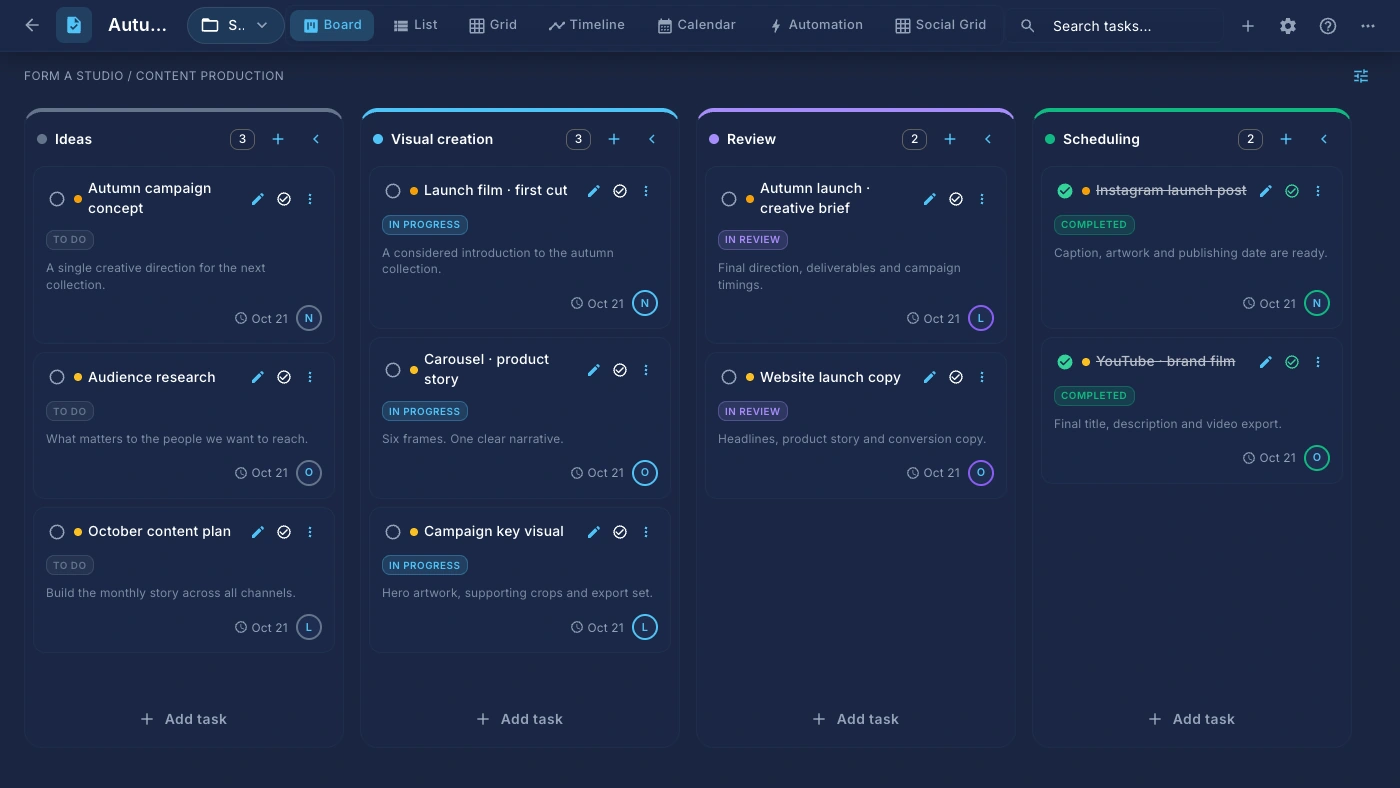
Give every task an owner, a deadline and the context to move forward.
Fictional example: Nour moves the Autumn launch creative brief from In progress to Review.
Available views and actions depend on your access. Time tracking and automations require an eligible paid plan.
Optional: explore the full Projects & tasks story ↗Control who can act, which project details they can change and what data they can see. Share access with a whole team in one step.
Fictional example: compare the displayed Project manager matrix with a Member view and assigned-record scope.
The displayed role matrix is an example, not the default of a named system profile. Access follows the configured project snapshot and applicable organization controls.
Optional: explore the full Permissions & scopes story ↗Bring the agreed brief, owners, deadlines and recorded effort into one working context.
Forma Studio is preparing an autumn launch: one creative direction and 12 social assets. Nour is creating the work; Layla is responsible for review.
Time records inform the conversation. They do not automatically turn into billable line items in this example.
Optional: follow the complete workflow ↗Coordinate creative work, publishing, paid campaigns and incoming messages.
The Autumn collection is ready to meet its audience. The team connects publishing accounts, prepares channel-specific content, sets up a paid campaign group and reviews organic and paid performance separately.
Provider support and account permissions affect what is available. Post analytics and advertising metrics are separate; this example does not imply cross-channel revenue attribution.
Optional: follow the complete workflow ↗Collect the essentials, prepare the brief and give the next person the context.
Forma Studio requests an autumn launch. The form captures the business, the work needed and the target date. A person reviews the response and prepares the working brief.
A form submission and a project task are separate steps here. Any automated connection needs a supported trigger, action and explicit workflow configuration.
Optional: follow the complete workflow ↗Configure supported triggers, conditions and actions with deliberate permissions.
When a task enters In review, check whether its priority is High. If it is, assign Layla. Other tasks do not take that assignment path.
This page demonstrates local example states. It does not save or execute a workflow. Live execution depends on valid configuration, plan limits and the permissions of the workflow owner.
Optional: follow the complete workflow ↗The workspace assistant helps the signed-in user with accessible work: finding a project, preparing a draft or using permitted tools. Available actions depend on configuration and access.
Use a conversational assistant to help with the AMS work you are authorized to access.
Fictional example: a teammate asks, “Find the Autumn launch project,” and sees an illustrative accessible result.
AI needs a configured provider. Available tools vary with permissions and configuration. The visual is a website explanation, not a recorded assistant execution.
Optional: explore the full AI assistant story ↗A brand agent assists customer conversations using configured knowledge and channel behavior. Choose Off, Suggest or Auto where supported, with human review and handoff suited to the work.
Give a brand agent the context to help with conversations and choose how it behaves on each channel.
Fictional example: the Autumn collection guide supports Instagram suggestions, while WhatsApp remains Off.
AI requires a configured provider; availability, quotas and provider charges depend on your workspace setup. AI responses can need correction. Auto mode is an explicit configuration, not the default behavior demonstrated here.
Optional: explore the full AI agents story ↗A compatible MCP client or an integration using AMS APIs can work with authorized records after the connection and access are configured. Compatibility depends on the client, supported operations and setup; this does not guarantee that every GPT, Claude or Grok interface can connect.
Compare the Autumn launch’s tracked effort with its linked invoices. Show the source records, flag missing cost rates and keep different currencies separate.
This is an illustrative request, not a completed analysis. A useful response should identify available task and time records, distinguish invoice amounts from payments, and say where links, cost rates or currencies prevent comparison. Recorded hours alone cannot establish profit, and a draft invoice does not prove payment.
The team reviews the evidence and decides what to do. An AI response does not guarantee accurate or complete analysis, and this reading example does not update a task or invoice.
Explore projects, content creation, publishing, campaigns, AI, people, finance and access controls.
Organize client and brand records so the team knows who the work belongs to.
Organize client and brand records so the team knows who the work belongs to.
Fictional example: Forma Studio is the client and Forma / Autumn collection is the associated brand context.
Brand and user limits depend on plan. The sample businesses and people shown are fictional.
Optional: explore the full Clients & brands story ↗Capture enquiries, qualify opportunities and keep the next sales action visible.
Keep the agreement and its signing process with the brand relationship.
Give every task an owner, a deadline and the context to move forward.
Give every task an owner, a deadline and the context to move forward.
Fictional example: Nour moves the Autumn launch creative brief from In progress to Review.
Available views and actions depend on your access. Time tracking and automations require an eligible paid plan.
Optional: explore the full Projects & tasks story ↗Record time against the task so the work and the effort stay connected.
Record time against the task so the work and the effort stay connected.
Fictional example: Nour records two hours of concept exploration and another hour and a half refining the direction.
Time tracking requires an eligible paid plan. A time entry is not automatically a billable invoice line.
Optional: explore the full Time tracking story ↗See your own priorities and the team’s next milestone.
Start repeated work from a useful structure.
See available capacity before promising more work.
Collect enquiries and structured responses in a form built around what your team needs to know.
Collect enquiries and structured responses in a form built around what your team needs to know.
Fictional example: Lina submits her name, email and an autumn collection project brief.
Lead creation is configurable; every form does not automatically create a project or lead. Sharing and response access depend on the form settings.
Optional: explore the full Forms story ↗Build a focused page for an offer, launch or enquiry inside your workspace.
Build a focused page for an offer, launch or enquiry inside your workspace.
Fictional example: Forma’s collection page moves from an opening message to product details and a discovery button.
Publishing, domains and page access depend on workspace configuration. The example page and business are fictional.
Optional: explore the full Landing pages story ↗Turn reusable templates and variable values into consistent PDF documents.
Turn reusable templates and variable values into consistent PDF documents.
Fictional example: an Autumn launch proposal receives Forma Studio and 21 October 2026 as its variable values.
Documents are a paid-plan capability. The sample PDF is fictional; it is not a signed agreement or an invoice.
Optional: explore the full Documents & PDFs story ↗Map processes and relationships on a visual canvas before they become complicated work.
Map processes and relationships on a visual canvas before they become complicated work.
Fictional example: a process map connects Creative brief, Visual direction, Review and Launch assets.
Diagrams require a paid plan. Drawing a workflow does not itself create an executable automation.
Optional: explore the full Diagrams story ↗Keep supporting material close to the task or record that gives it meaning.
Keep supporting material close to the task or record that gives it meaning.
Fictional example: the creative brief has an Autumn launch proposal PDF and Collection artwork attachment.
Preview support varies by format. Storage and upload limits apply. The website sample does not upload files.
Optional: explore the full Files & attachments story ↗Find a useful starting point and share reusable work.
Compose, organize and schedule social content by brand and connected account.
Compose, organize and schedule social content by brand and connected account.
Fictional example: Forma Studio’s Instagram collection post is scheduled for 21 October at 11:00.
Publishing requires a paid plan. Supported media, post types and scheduling behavior vary by provider, account and permissions.
Optional: explore the full Social publishing story ↗Plan, create and manage paid campaigns with the creative work and performance in view.
Review paid campaign activity alongside the rest of your brand’s work.
Fictional example: Forma Studio’s Meta awareness campaign shows a $40 daily budget and illustrative delivery figures.
Ads spend is paid to the provider separately. Providers expose different controls and metrics; examples are illustrative, not results or performance promises.
Optional: explore the full Campaigns & paid ads story ↗Explore available channel metrics with the context of your brand’s content and campaigns.
Explore available channel metrics with the context of your brand’s content and campaigns.
Fictional example: Forma Studio’s October report shows 32,000 reach and 2,680 interactions.
Metric availability, history and freshness depend on provider access and synchronization. The sample figures are fictional and do not prove attribution or ROI.
Optional: explore the full Analytics story ↗Bring supported brand conversations into a shared place for the people handling them.
Bring supported brand conversations into a shared place for the people handling them.
Fictional example: Lina asks Forma Studio whether the collection is available in store; Nour reviews a suggested reply.
Inbox requires a paid plan. Supported message types, reply windows and channel capabilities vary by provider.
Optional: explore the full Social inbox story ↗Handle direct conversations alongside the wider business context.
Keep quotations, line items and draft invoices close to the work they represent.
Keep quotations, line items and draft invoices close to the work they represent.
Fictional example: a $1,000 accepted quotation contains $750 for creative work and $250 for content planning.
Accepting a quotation does not automatically send an invoice or collect payment. Sample amounts are fictional.
Optional: explore the full Quotations & invoices story ↗Give business spending a record and a review path.
Build a proposal from a clearer view of what you sell.
Understand what a project earns and what it takes to deliver.
Keep people, employment terms and organizational structure in context.
Make availability and time away easier to coordinate.
Prepare payroll with the supporting records in reach.
Know which assets the business has and who holds them.
Turn repeatable decisions into workflows your team can inspect, test and control.
Turn repeatable decisions into workflows your team can inspect, test and control.
Fictional example: a high-priority task entering In review is assigned to Layla by a configured workflow.
Automations require a paid plan. Triggers and actions are filtered by permissions, scope, connected account capabilities and configuration.
This page simulates a task-status rule locally; it does not execute a server workflow or send notifications.
Optional: explore the full Automations story ↗Give a brand agent the context to help with conversations and choose how it behaves on each channel.
Give a brand agent the context to help with conversations and choose how it behaves on each channel.
Fictional example: the Autumn collection guide supports Instagram suggestions, while WhatsApp remains Off.
AI requires a configured provider; availability, quotas and provider charges depend on your workspace setup. AI responses can need correction. Auto mode is an explicit configuration, not the default behavior demonstrated here.
Optional: explore the full AI agents story ↗Use a conversational assistant to help with the AMS work you are authorized to access.
Use a conversational assistant to help with the AMS work you are authorized to access.
Fictional example: a teammate asks, “Find the Autumn launch project,” and sees an illustrative accessible result.
AI needs a configured provider. Available tools vary with permissions and configuration. The visual is a website explanation, not a recorded assistant execution.
Optional: explore the full AI assistant story ↗Turn available work data into something the team can review.
Control who can act, which project details they can change and what data they can see. Share access with a whole team in one step.
Control who can act, which project details they can change and what data they can see. Share access with a whole team in one step.
Fictional example: compare the displayed Project manager matrix with a Member view and assigned-record scope.
The displayed role matrix is an example, not the default of a named system profile. Access follows the configured project snapshot and applicable organization controls.
Optional: explore the full Permissions & scopes story ↗Extend supported records with the information that makes your way of working specific.
Extend supported records with the information that makes your way of working specific.
Fictional example: a task records Autumn collection, 12 assets and a Ready for review checkbox.
Field types and scope depend on the entity and configuration. Custom fields do not bypass record permissions.
Optional: explore the full Custom fields story ↗Configure a workspace that fits the organization using it.
Control how people enter the workspace and how material is shared.
Keep up with the work that needs your attention.
Connect supported business processes without losing access control.
Keep organization recovery within the authorized administration workflow.
Help people learn the workspace and stay informed.
Keep the work and the context in one workspace. Roles, project permissions and data scopes determine who can see and change it. Platform capabilities and plan limits still apply.
Review integrations and requirements ↗ · How data and access are handled ↗AMS access is currently by request. Tell us about your company and the workflow you want to bring together. A request does not start a trial, create a paid subscription or charge you.